

Traffic cutting is a vision skill first
This Ghost Driver traffic cutting guide begins with vision because most failed cuts are decided before the steering input starts. The official description positions Ghost Driver as an underground highway traffic-cutting experience, but the useful skill is not simply driving as fast as possible. You need to recognize where traffic is moving, how quickly you are closing on it and whether the lane you want will still be open when you arrive. A player who sees the next problem early can make a small correction. A player who sees it late usually needs a large, unstable correction.
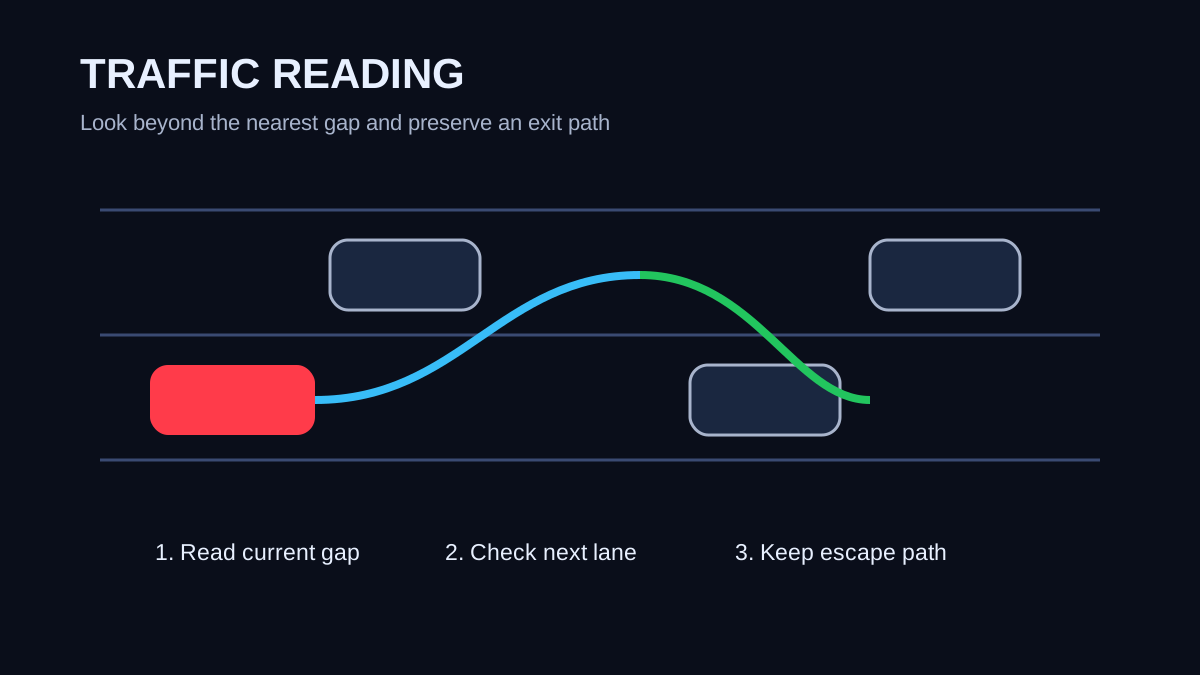
Use the Ghost Driver traffic cutting guide habit of looking two decisions ahead. Before moving into an open lane, identify what waits in that lane after the pass. Then check whether another lane remains available if the first plan closes. This turns traffic from a series of surprises into a sequence you can anticipate. You will still react to unexpected movement, but your normal line will require fewer emergency inputs. That is the foundation of cleaner high-speed runs.
Judge closing speed, not just distance
Distance can be misleading at high speed, so a Ghost Driver traffic cutting guide has to teach closing speed. A car that looks far ahead may become an immediate obstacle if your speed is much higher. Watch how quickly the vehicle grows in your view. If that change is rapid, treat the gap as shorter than it looks. Begin planning the pass before you reach the point where braking and steering become equally urgent. Early decisions let you use smoother inputs and keep more space around the car.
A practical Ghost Driver traffic cutting guide exercise is to drive at a moderate pace and call each gap open, temporary or closing. An open gap gives you time to move and stabilize. A temporary gap is usable only if you have already checked the next lane. A closing gap should be treated as blocked even if the visual space still exists. This mental labeling builds the habit of predicting traffic instead of reacting to the final frame before contact.
Enter gaps with an exit plan
Every move in this Ghost Driver traffic cutting guide should include an exit plan. Before changing lanes, know where you will place the car after the pass and what you will do if the next opening closes. The safest fast line is often not the shortest line. A slightly wider decision that leaves two options can be better than a narrow cut that leaves only one. Preserving choices matters because traffic can compress quickly when you are travelling much faster than surrounding vehicles.
Do not stack lane changes before the car has stabilized. The Ghost Driver traffic cutting guide sequence is move, settle, scan, then move again. Rapid left-right inputs can look impressive but reduce the time available to confirm the second gap. If you want to practice combinations, start at a pace where each transition remains deliberate. Increase speed only when the pattern stays smooth. Clean traffic cutting is easier to scale upward than chaotic traffic cutting is to repair.
- Identify the current opening.
- Check what sits beyond that opening.
- Choose a lane you can occupy after the pass.
- Keep one escape lane whenever possible.
- Stabilize the car before beginning the next cut.
Use braking as a traffic-cutting tool
Braking is not failure. In this Ghost Driver traffic cutting guide, braking is one of the tools that keeps a run alive. If two gaps close at once, reducing speed can create a new timing window instead of forcing a low-percentage move. Many crashes happen because a player treats every slowdown as lost progress. A short lift or brake input can protect the entire run and position the car for a better opening seconds later.
Practice braking before dense groups rather than after you are already trapped. The Ghost Driver traffic cutting guide goal is to control when you lose speed. Planned slowing keeps the car balanced and leaves time to choose a lane. Emergency slowing while turning creates more work for the driver. Once you become comfortable sacrificing a little speed, you stop feeling pressured to take every narrow gap and your average run becomes much longer.
Add speed in controlled steps
The safest way to improve with this Ghost Driver traffic cutting guide is progressive speed. Pick a familiar section and complete several clean runs at one pace. Then add a small amount of speed without changing your basic line. If crashes suddenly increase, return to the previous pace and identify which decisions became rushed. This creates a clear relationship between speed and your current vision limit.
Do not measure Ghost Driver traffic cutting guide progress only by the fastest number you see. Measure how often you can repeat a sequence without contact and how early you recognize a bad gap. A player who knows when not to cut is becoming faster in a meaningful way because fewer runs end early. Eventually the same traffic patterns that felt impossible at first become manageable because your scan happens sooner and your steering input becomes smaller.
Review mistakes by category
After a crash, classify the mistake using the Ghost Driver traffic cutting guide framework. Was the gap already closing? Did you miss the second vehicle? Did you make a second lane change before stabilizing? Did you carry too much closing speed into dense traffic? A category gives you something specific to practice. “Drive better” is not a useful instruction, but “look one lane farther ahead before moving left” is.
The strongest Ghost Driver traffic cutting guide routine is simple: scan early, judge closing speed, preserve an exit path, stabilize between cuts and use braking when the situation becomes uncertain. Those principles are more durable than a single route or car recommendation because they apply whenever the traffic pattern changes. As Ghost Driver evolves through Pre-Alpha, exact handling can move, but better visual planning will continue to make high-speed driving cleaner and more repeatable.